


Blog
Field Service Management Software: A Buyer's Guide
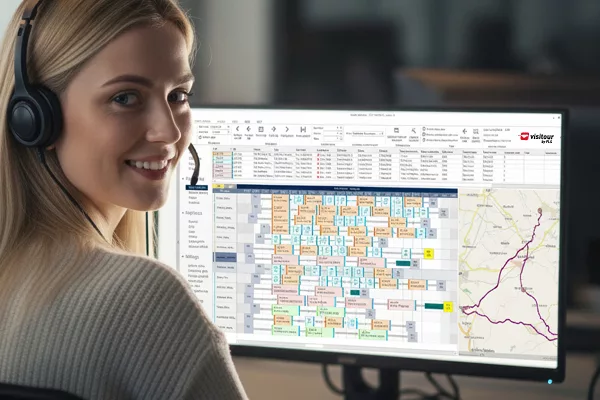
Choosing the right field service management software can be challenging, with many solutions available and tools and features varying considerably. This practical guide explains what to look for when comparing field service management systems, from scheduling and route optimisation to integrations and wider business requirements. Find the right software to improve productivity, streamline operations and help your field service team deliver better results.
Contents
Choosing FSM software: Key points
- The market for field service management software is extremely diverse.
- Broadly speaking, there are three approaches: 1. All-in-one FSM systems, 2. Specialised FSM optimisation solutions, 3. ERP and CRM systems with FSM functions.
- It is not enough to check off available functions. The depth of the solution and the actual added value of the software are critical.
- Involve your internal stakeholders at the earliest stage and engage suppliers.
When do businesses need field service management software?
Companies need field service management software when the systems they have been using are no longer sufficient to manage field service efficiently. This may be triggered by the field service team growing, the service business becoming more complex, or cost pressures and customer expectations requiring service processes to be optimised.
Excel, Outlook and basic planning tools are not up to the job
As long as you only need to coordinate a small number of field staff, orders are largely predictable and there are few interdependencies, then calendars, spreadsheets or simple planning tools may suffice. The need for a specialised solution arises as soon as the scheduling team must regularly coordinate a large number of orders, resources and rules.
Clear signs that an FSM solution is needed
Day-to-day work makes it apparent that dedicated FSM software is necessary:
- Scheduling takes a long time and requires a great deal of manual coordination.
- The quality of planning depends heavily on the expertise of individual schedulers (including local knowledge).
- Last-minute changes trigger extensive rebookings and a flurry of phone calls.
- There is little transparency regarding the status of assignments and orders.
- Routes are planned but not systematically optimised.
- Feedback from field staff arrives late or is incomplete.
With the right field service management software, scheduling can be significantly speeded up, assignments and routes are optimised, processes become consistently efficient and transparent, and overall service performance is enhanced.
Why is it so difficult to choose the right FSM software?
Anyone looking for field service management software will find themselves faced with a bewildering, diverse market.
At the same time, virtually all software developers promise the same thing: efficiency gains and cost reductions, increased productivity and more satisfied customers. However, determining whether their solutions are a good fit for your business and whether they actually deliver the promised results requires careful scrutiny and evaluation.
What field service management software is available?
Field service management encompasses a wide range of processes, from customer enquiries through to order planning and execution, right through to documentation and invoicing. Not every software solution needs to cover all of these processes.
Broadly speaking, there are three different approaches:
1. All-in-one FSM systems / FSM platforms
These FSM solutions aim to cover the entire service chain and map all processes within a centralised platform. They are particularly suitable for organisations wishing to comprehensively modernise or consolidate their existing system landscape.
However, it is important to examine the performance of the individual modules in more detail. A wide range of functions does not automatically mean that every function meets even very complex requirements.
2. Specialised FSM optimisation solutions (best-of-breed)
Specialised FSM solutions focus on specific areas of field service, such as resource planning, route optimisation or mobile order processing. As a result, they deliver exceptional performance in these areas. This approach is also known as ‘best-of-breed’.
Bespoke FSM solutions can be particularly attractive where there are high functional requirements and an existing ERP or CRM system (or, in some cases, even an FSM system) is to continue to be used.
3. ERP and CRM systems and industry-specific solutions with FSM functionality
Many companies already rely on ERP and CRM systems such as SAP, Microsoft Dynamics and Salesforce, or use an industry-specific ERP system. Some of these systems offer their own functions for service management and resource planning. Whether these are sufficient depends on individual requirements.
An important question is therefore:
Do you need to replace your existing system, or do you simply require a more powerful optimisation solution for individual service processes?
A specialised add-on may be a more sensible option than a complete system change. Conversely, consolidating on a single platform can offer advantages if your processes and requirements are well suited to its range of functions.
To summarise once again:
Types of Field Service Management software
The key selection criteria for FSM software
1. Resource planning and scheduling
Resource planning is a key function of FSM software. It determines which member of staff is assigned to which job.
Where there are few orders and relatively stable daily routines, a simple planning board may suffice. In complex service organisations, however, the planning department must take numerous factors into account simultaneously:
- Availability, working hours and absences
- Skills, qualifications and certifications
- Locations and journey times
- Job priorities and SLAs
- Customer-specific appointment slots
- Maintenance intervals and due dates
- Required materials and spare parts
- Multi-day jobs and team assignments
- Emergency services and last-minute disruptions
Here’s what you should bear in mind:
Do not simply check whether the software can manage this information. What matters is whether it actually takes the information into account when planning operations.
Can the system automatically identify suitable employees? How are conflicting goals handled? How many orders and resources can it schedule, and how long does it take to do so? And how much manual work remains for the schedulers?
2. Route optimisation
Simply displaying appointments in a calendar does not constitute intelligent route planning. Powerful optimisation systems consider jobs and resources in context. They seek out favourable combinations of technician allocation, scheduling and route planning.
The system should be able to take several objectives into account, for example:
- Minimise journey times
- Increase order throughput
- Reduce overtime
- Ensure on-time delivery and compliance with SLAs
- Utilise resources evenly
In complex service organisations, it is essential to combine and balance these sometimes conflicting objectives in a sensible way. Intelligent route optimisation is much more than simply reducing the number of miles/kilometres travelled.
Key examination questions:
- Does the system optimise individual routes or the entire service organisation?
- Can different objectives be weighted individually?
- How many orders and resources can the system process reliably?
- How quickly does it deliver results?
Let us demonstrate these capabilities to you using realistic data.
3. Flexibility (Dynamic re-optimisation)
Even the best deployment plan rarely remains unchanged for long: a job takes longer than expected; a technician is unavailable; an important customer reports a fault; other tasks are completed earlier than planned.
The FSM software should be able to handle such changes without the dispatcher having to manually revise the entire schedule every time. Systems that optimise deployment and route plans only once a day or just overnight are not sufficient given the dynamic nature of today’s field service operations.
You should therefore check:
- Can the system schedule new orders at short notice?
- Are the implications for other routes taken into account automatically?
- Can appointments that have already been confirmed be protected?
- How quickly is a new, workable plan generated?
- Can dispatchers understand the suggested changes and intervene if necessary?
Particularly in dynamic service organisations, this is a key distinguishing feature between basic planning functions and advanced optimisation.
FREE VIDEO
Produkt-Demo VISITOUR:
Ausführliche Einblicke in die Software zur smarten Einsatzplanung und Tourenoptimierung im Field Service
Jetzt entdecken


4. Mobile order processing
Effective planning is only one aspect of field service management. Equally important is the efficient execution of jobs on site. A mobile application should support field staff in their day-to-day tasks without creating additional red tape.
Typical requirements include:
- Digital order information and service histories
- Checklists, forms and reports
- Photo and document uploads
- Digital signatures
- Status updates to the dispatch team
- Offline capability in the event of a lost network connection
Depending on the sector, there may be additional requirements, such as comprehensive test reports, complex plant structures or specific documentation obligations.
Practical tip:
Ensure that the mobile app is integrated with the planning solution. Office and field staff must be able to work together and communicate with one another on an ongoing basis.
5. User-friendliness and acceptance
Highly functional field service management software is of little use if users do not embrace it. On the one hand, the software’s user-friendliness is key. Furthermore, the solution must be embraced throughout the entire organisation, not just by the actual users!
Needs vary depending on the role:
- Planners need transparency and efficient ways to respond to exceptions.
- Technicians need an easy-to-use mobile app.
- Service managers need meaningful key performance indicators.
- IT managers prioritise manageability and security.
- Senior management, procurement and finance focus on costs, payback periods and profitability.
Important:
You should therefore involve your stakeholders and representatives of all relevant user groups in the selection process at an early stage.
6. Integration into existing systems
Many companies already have a centralised IT infrastructure comprising ERP, CRM and other applications. The FSM software must integrate seamlessly and effectively. This is a step that is often underestimated when implementing the new solution.
Typical areas of integration include:
- Customer and master data
- Fixed assets and technical objects
- Service orders and maintenance contracts
- Materials management and spare parts
- Time recording and payroll
- Customer communication and reporting
Clarify which system holds which data and how information is exchanged between the applications.
Not every integration needs to take place in real time. However, in the case of short-notice changes to plans or status updates, prompt synchronisation can be business-critical.
Practical tip:
What matters is not the number of available interfaces, but whether the system supports your specific processes. Make sure you check which systems the FSM provider has experience with.
7. Scalability and performance
A solution that works well for 20 technicians is not necessarily suitable for 500 or 1,000 employees. As a company grows, the volume of data and the complexity of planning increase.
You should therefore check:
- How many resources and jobs can be managed?
- Can multiple sites and service areas be planned together?
- Will the system still work as our service organisation grows?
- How does the system cope with peak loads?
- What performance does the software achieve when using your real-world data?
When doing so, take into account not only your current organisation, but also planned growth, new locations or future services.
8. Safety, operations and sustainability
Field service management software must not only be functionally suited to the service and the organisation; it must also meet technical and organisational requirements.
These include, in particular:
- Data protection and GDPR compliance
- Role and authorisation models
- Encryption and access security
- Availability and contingency plans
- Cloud operations, hosting and data residency
- Interfaces and extensibility
- Support, maintenance and release management
Thinking long-term:
The provider’s long-term viability is also a factor. How is it developing its product further? What are the foundations (technological and financial) of its success? What are its prospects for future business development?
The most common mistakes when choosing FSM software
Mistake 1: Comparing user roles without a clear understanding of business objectives
A long list of requirements is no substitute for a clear definition of business objectives. Ask yourself: what do we actually want to achieve with the new software?
Mistake 2: Equating functional scope with performance
Having lots of features does not necessarily mean that your requirements will be met. In field service, the depth of the solution is also a key factor.
Mistake 3: Only taking today's needs into account
The solution should also be suitable for future growth and new requirements. Discuss your medium- and long-term prospects with the provider.
Mistake 4: Only watching a standard demo
The key factor is how the software handles the real-world challenges faced by your organisation. A personalised demo, using your own field service data where appropriate, will give you a realistic impression.
Mistake 5: Underestimating the effort required for integration and data quality
High-performance software requires suitable master data, clear lines of responsibility and effective interfaces. Do not underestimate the internal workload that the project will entail.
Mistake 6: Not involving users
You should involve your staff at an early stage, for example key users from the planning department and the field service. This plays a decisive role in determining the acceptance and subsequent use of the software.
Mistake 7: Focusing solely on the investment costs
The price of the software plays a key role. However, it is only one side of the coin. Draw up a business case that compares the total costs over the software’s useful life with the expected benefits.
YOUR GUIDE
Greater Efficiency and Revenue with AI and Real-time Data
Begin your field service business case with intelligent software
Read now
Checklist: Questions for the provider
The following questions help to clarify the information provided during initial discussions and demonstrations:
- Which of our requirements can the standard solution meet?
- Which planning rules and restrictions does the software take into account?
- How can the scheduling be adapted to our organisation and our business?
- Does the solution support multi-day assignments and other special cases?
- Does the system optimise both order allocation and route sequencing?
- Is it possible to re-optimise assignments and routes during the day?
- How does the system respond to cancellations, delays and new urgent orders?
- What manual interventions can the dispatcher carry out?
- Is the mobile app capable of working offline, and how exactly does that work?
- What data can be exchanged with our ERP or CRM system?
- Do you have experience integrating with our ERP/CRM?
- What KPIs and planned-versus-actual analyses are available?
- Can you demonstrate our key processes using your own scenarios?
- Is it possible to run a test using realistic or historical data?
- What comparable reference projects can you provide as evidence?
Conclusion: What matters most is the added value that the FSM software brings you
The right field service management software is not necessarily the solution with the most features or from the best-known provider. What matters is how well it fits in with your processes, objectives and operational requirements.
In complex service organisations in particular, it is worth paying close attention to resource planning, route optimisation and mobile order processing. After all, it is here that the efficiency with which available resources are actually utilised is determined on a daily basis.
You should therefore not simply check what features a piece of software promises. Assemble your team, use specific scenarios, and ready your real-world data to assess the added value it brings to your service business.
Author:

André Bock
Sales Manager & Senior Consultant
Background and expertise in the field of FSM:
- Graduate in Economics and Mathematics (Schleswig-Holstein University of Applied Sciences)
- Has been working in the FSM sector since 2008, in a wide variety of roles
- Support and project management for over 100 client projects
André Bock is an expert in Field Service Management (FSM), specialising in resource planning, route optimisation and digital service processes. As a key member of Solvares Field Service (formerly FLS – FAST LEAN SMART), he has spent over 17 years exploring how companies can manage their technical field service teams more efficiently, productively and in a more customer-focused manner.